n4patch: MouseCam v1.4.1
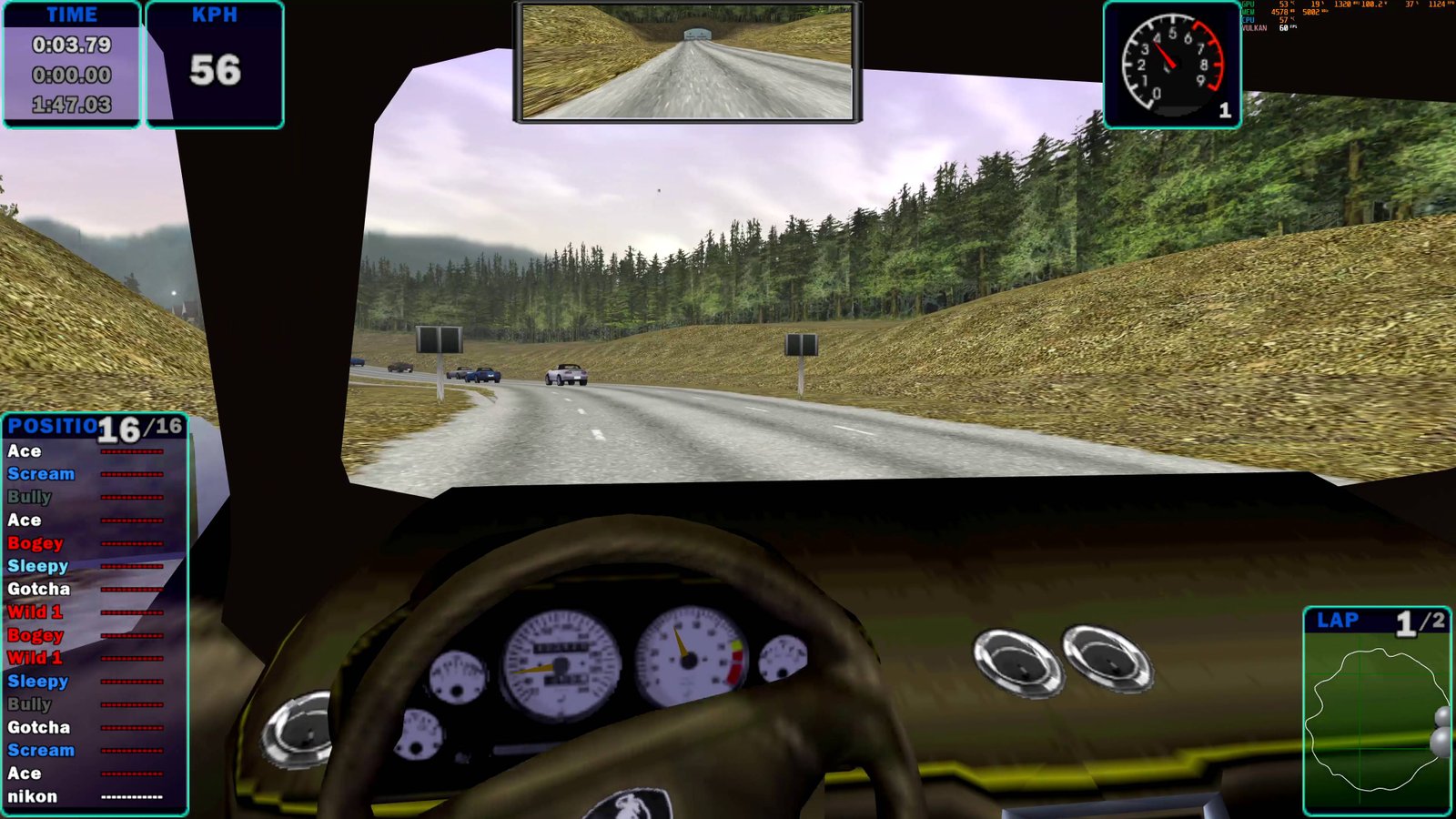
MouseCam: Free Mouse Look in the Cockpit of NFS4 High Stakes
MouseCam (mousecam.n4p) is an n4patch module that adds the ability to freely look around your car's cockpit using the mouse in Need for Speed: High Stakes (1999).
In the original game, the cockpit camera has a fixed viewing direction. The driver can only look straight ahead, and looking around requires switching between different cameras.
MouseCam removes this limitation. You can now turn your head left and right, look up and down, glance over your shoulder, and observe what's happening around your car.
Video demonstration: MouseCam in Action
Features
Free Mouse Look
Mouse movements directly control the driver's viewing direction.
- Turn your head left and right.
- Look up and down.
- Look all the way behind you with up to 180° of horizontal rotation in either direction.
- Smooth camera movement without sudden jumps.
- No virtual cursor drift during continuous camera movement.
The viewing angle is proportional to mouse movement. Small movements allow precise adjustments, while faster movements let you quickly turn your head.
Natural Head Movement
The camera does more than simply rotate around a fixed point.
MouseCam simulates head movement around the neck, slightly changing the position of the driver's eyes when turning or tilting the head.
When looking backward, an additional over-the-shoulder lean is applied. The camera shifts slightly toward the direction of the turn and forward, providing a better view behind the car.
This is especially useful in cars where the seat back or other interior elements obstruct the rearward view.
Camera movement affects both the outside view and the rendering of the cockpit interior.
Adjustable Viewing Limits
You can independently configure the maximum viewing angles:
- Left and right, up to 180° in each direction.
- Up and down, up to 90° in each direction.
For example, you can allow a 120° turn to the left while limiting the right turn to 90°.
When a configured limit is reached, the camera stops rotating. Moving the mouse in the opposite direction immediately turns the view back.
Sensitivity and Smoothing
MouseCam allows you to configure mouse sensitivity and camera smoothing independently.
Smoothing distributes mouse movement across several rendered frames, making camera rotation feel more natural.
The final viewing angle remains proportional to the actual mouse movement.
Smoothing can also be disabled completely.
Replay Support
MouseCam works both during races and while watching replays.
By default, mouse look in replays is activated by holding the right mouse button.
You can optionally change this behavior so that a single right-click toggles mouse look on or off.
All other game cameras retain their original behavior.
Configuration
The module uses a mousecam.ini configuration file located next to nfs4.exe.
Example configuration:
[MouseCam]
ReplayToggle=0
HideRaceCursor=1
SensitivityArcMinPerCount=6
SmoothingMs=30
MaxLookXPositiveDeg=180
MaxLookXNegativeDeg=180
MaxLookYPositiveDeg=85
MaxLookYNegativeDeg=85
HeadArcRadiusCm=12
RearPeekSideCm=40
RearPeekForwardCm=10
RearPeekStartDeg=100
Configuration Options
| Parameter | Description |
|---|---|
ReplayToggle |
Toggle mouse look in replays instead of holding the right mouse button |
HideRaceCursor |
Hide the mouse cursor during races |
SensitivityArcMinPerCount |
Mouse sensitivity |
SmoothingMs |
Camera movement smoothing |
MaxLookXPositiveDeg |
Maximum viewing angle to the right |
MaxLookXNegativeDeg |
Maximum viewing angle to the left |
MaxLookYPositiveDeg |
Maximum viewing angle in one vertical direction |
MaxLookYNegativeDeg |
Maximum viewing angle in the opposite vertical direction |
HeadArcRadiusCm |
Radius of eye movement around the neck |
RearPeekSideCm |
Sideways camera movement when looking backward |
RearPeekForwardCm |
Additional forward camera movement when looking backward |
RearPeekStartDeg |
Horizontal angle at which the over-the-shoulder lean begins |
All distances are measured in centimeters and viewing angles in degrees, except for mouse sensitivity, which is measured in arcminutes per relative mouse movement count.
Configuration examples:
- For more precise control, decrease
SensitivityArcMinPerCount. - For faster response, decrease
SmoothingMsor set it to0. - To limit how far you can look backward, decrease
MaxLookXPositiveDegandMaxLookXNegativeDeg. - If the seat obstructs the rear window, increase
RearPeekSideCm. - To disable sideways leaning when looking backward, set
RearPeekSideCm=0. - To disable the curved movement of the driver's eyes, set
HeadArcRadiusCm=0.
Missing configuration options are automatically added to the INI file.
Restart the game after changing the settings for them to take effect.
Installation
- Install the n4patch Loader.
- Extract the MouseCam archive into your game directory, where
nfs4.exeis located. - Make sure
mousecam.n4pis in then4patchfolder andmousecam.iniis next to the game executable. - Launch Need for Speed: High Stakes.
- During a race, switch to the cockpit camera and move the mouse to look around.
In replays, hold the right mouse button to activate mouse look by default.
Compatibility and Limitations
- Designed for Need for Speed: High Stakes (1999), PC.
- Requires a compatible n4patch loader.
- During races, mouse look works only in cockpit view.
- During replays, mouse look is activated using the right mouse button.
- All other cameras retain their original behavior.
- Configuration changes require restarting the game.
Development Status
Version v1.4.1 is a Release Candidate.
The main features are implemented, but additional testing with different game configurations and custom cars is still welcome.
If you encounter bugs, camera positioning issues, or unexpected behavior in specific vehicles, please report them.
Project website: https://nfs4.com
Other n4patch modules: https://nfs4.com/mods
コメント
まだコメントはありません。
コメント・評価にはログインが必要です。 ログイン