n4patch: Expand the Track Limit to 255 in NFS4 High Stakes
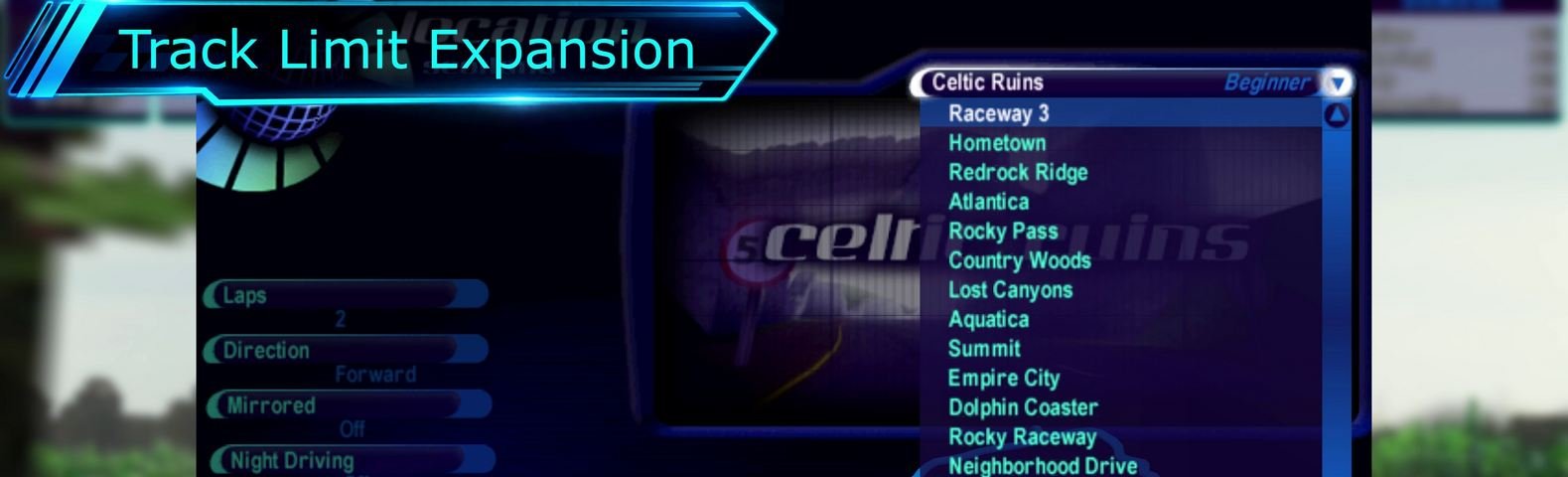
Track Limit Expansion: Up to 255 Tracks in Need for Speed: High Stakes (1999)
Track Limit Expansion (track_limit.n4p) is an n4patch module that increases the original track limit in Need for Speed: High Stakes from 19 to 255 tracks.
Additional tracks are integrated into the original game interface, including the track selection menu, track information screen, and records system.
Beyond expanding the track limit, the module automatically generates missing track artwork and 3D route models, and introduces independent record storage for different race conditions.
Features
- Up to 255 Tracks: Add custom tracks without replacing the original ones.
- Original Interface Integration: Additional tracks appear in the standard track selection menu and information screens.
- Automatic 3D Route Generation: Generate three-dimensional track previews from VRoad data.
- Automatic 2D Map Generation: Create route maps for the track information screen.
- Automatic Vidwall Generation: Generate track preview images matching the original game's visual style.
- Automatic Loading Slides: Generate loading screens featuring a 3D representation of the track.
- Independent Track Records: Each track stores its own records in its directory.
- 16 Record Categories: Separate records for combinations of time of day, driving direction, mirrored mode, and weather.
- Tournament and Knockout Support: Custom tracks can be included in standalone tournament schedules.
- Replay Support: Correctly display additional track information when loading replays.
- INI Configuration: Configure the track count, names, directories, and additional parameters.
Video: https://youtu.be/fQ-1FpoHtLY
Automatic Asset Generation
The original game uses several separate resources to display track information, including a 3D route model, a 2D map, a Vidwall preview, and a loading slide.
These resources are often missing from custom tracks.
The n4patch module can automatically generate them using the track data:
| Resource | Generated File |
|---|---|
| 3D Route | _n4route.viv |
| 2D Map | _n4map.qfs |
| Vidwall | _n4vidwall.qfs |
| Loading Slide | _n4slide.qfs |
Generated files are stored directly in the track directory and reused on subsequent game launches.
Assets are generated only when the corresponding resources are missing. Existing original artwork and custom files always take priority and are never overwritten.
To regenerate an automatically created asset, simply delete the corresponding _n4* file and restart the game.
New Records System
The module changes how records are stored in NFS4.
Instead of using the shared SaveData\records.dat file, every track, including the original ones, now uses its own record file:
Data\Tracks\<dir>\RECORDS.N4R
Each track has 16 independent record categories based on four race settings:
- Day or Night.
- Forward or Reverse direction.
- Normal or Mirrored track.
- Dry or Rainy weather.
For example, records set during daytime and nighttime races on the same track are now stored separately.
New lap records are saved immediately when they are set, rather than only after the race finishes. This allows a new record to survive a subsequent race restart, provided the save completed successfully.
Record files use a binary format with integrity checks and safe file updates.
Please note: Existing records from the original records.dat file are not automatically imported.
Configuration
The module is configured through n4tracklimit.ini, located next to nfs4.exe.
Example:
[track_limit]
count=20

[track19]
dir=MYTRACK1
name=My Track 1
difficulty=Intermediate
Here, count=20 specifies the total number of tracks, including the original 19, while the [track19] section defines an additional track.
For most custom tracks, there is no need to manually specify a base track or frontend resources. The module attempts to detect them automatically.
The maximum supported track count is 255.
Installation
- Install a compatible n4patch loader.
- Place
track_limit.n4pin the game'sn4patch/directory. - Copy
n4tracklimit.ininext tonfs4.exe. - Configure the track count and additional track settings.
- Start the game.
Check n4patch.log to verify that the module has loaded successfully.
The module requires a loader supporting Loader Info API v1.
The original game executable is not modified. All necessary changes are applied directly in memory by the loader at startup.
Important
This module is designed for Need for Speed: High Stakes (1999), PC and requires a compatible n4patch loader.
Before using it, we recommend backing up your game profiles, save files, and records, especially if you are using other modifications.
For more information and updates, visit https://nfs4.com.
Comments
Very nice. But tracks from race way 1 to empire city are being not selectable(grey out) with this plugin enabled in my game.
Log in to leave a comment and rate. Log in