CLI car.viv editor for NFS4:HS
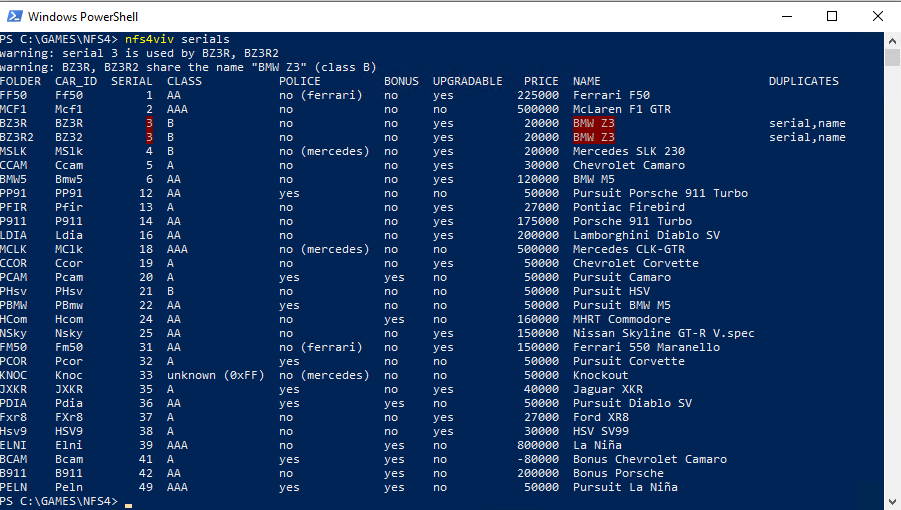
A command line utility for editing car data in Need for Speed 4: High Stakes (NFS 4: HS).
This specialized utility provides a convenient way to view, modify, and save the internal text data stored in car configuration files (car.viv).
I originally made it while testing support for more than 49 cars in the game.
I needed a quick way to check for duplicate serial numbers, see which cars the game should recognize, and view their names.
Key features:
- CLI interface
- Update fedata for all languages at once
- Quickly scan the CARS folder for duplicate serial numbers
- Quickly edit fedata
- Export and import data in JSON format
The utility is still under development. If you find any problems or bugs, please report them in the comments.
Simple example:
nfs4viv fedata set .\DATA\CARS\BZ3R2\CAR.VIV --lang all car_id BZ32 serial 7 car_name "BMV Z3 II"
README.md
nfs4viv
nfs4viv reads and edits Need for Speed 4 car.viv archives and the fedata
files inside them. It can list and check car serial numbers, change any
textual or numeric fedata field in one or all localizations, and export or
import the data as JSON. The VIV (BIGF) container and the NFS4 fedata layout
match the ones documented by VivLib and
used by Vivianne.
Main repository
https://github.com/lnikonl/nfs4viv
Build
Requires Go 1.24 or newer.
make build          # bin/nfs4viv (linux/amd64)
make windows        # bin/nfs4viv.exe (windows/amd64)
make dist           # bin/ plus release archives in dist/
make test           # go test ./...
Without make, ./build.sh builds both binaries and the archives. VERSION
is embedded into the binary and used in the archive names; it defaults to
dev. Linux ships a nfs4viv-<version>-linux-amd64.tar.gz, Windows a
nfs4viv-<version>-windows-amd64.zip; every archive contains the binary,
README.md and LICENSE. The archives are written by cmd/packdist, so no
external archiver is required.
Testing
make test (or go test ./...) runs the synthetic fixtures from cartest.
The same run also exercises export/import, resource validation, and byte-identical
extract/pack round trips, including --sub, against original car samples.
Resource tests read NFS4_CARS when set, otherwise look under
original/nfs4viv/DATA/CARS and the sibling
../nfs4net/original/NFS4/DATA/CARS. They skip when samples are unavailable,
so the suite is safe to run anywhere. All synthetic codec and validator tests
run without original files.
CI on the private GitLab fetches the data-only gitlab/original-data branch
and runs the tests a second time with the samples in place.
The FCE corpus test also parses and rebuilds the exported OBJ geometry, checking
each part's coordinates, normals, UVs, flags and animation data. An optional real
Blender integration test uses the official bpy Python module to import, subdivide,
move and export a multipart mesh before rebuilding its FCE:
NFS4_BLENDER_PYTHON=/path/to/python-with-bpy go test ./resources -run Blender -v
This also tests authoring a body and four wheels entirely in Blender and creating a new FCE without an imported donor.
Commands
# List every car found in a game cars folder. Each subfolder (car00, car01,
# ...) is expected to hold a car.viv archive. Without DIR the cars are
# collected from ./DATA/CARS and ./SAVEDATA/CARS relative to the working
# directory.
./nfs4viv serials "C:\Games\NFS4\DATA\CARS"
./nfs4viv serials
./nfs4viv serials -sort class
./nfs4viv serials -check-off
./nfs4viv serials -json -lang ger "C:\Games\NFS4\DATA\CARS"

# Print every editable text and numeric field of a fedata file, either read
# directly or from inside a VIV archive.
./nfs4viv fedata show "C:\Games\NFS4\DATA\CARS\car07\car.viv"
./nfs4viv fedata show -json -entry fedata.eng ./car.viv

# Create a new fedata file; unspecified fields start empty/zero.
./nfs4viv fedata create ./fedata.eng car_id NEW1 serial 42 car_name "Aurora GT" class A

# Change one or more fedata fields. The VIV is repacked in place; -o writes a
# copy instead. Values are applied left to right.
./nfs4viv fedata set "C:\Games\NFS4\DATA\CARS\car07\car.viv" serial 12
./nfs4viv fedata set "C:\Games\NFS4\DATA\CARS\car07\car.viv" -o patched.viv car_name "Ferrari F50 GT" price 500000
./nfs4viv fedata set ./fedata.eng bonus yes upgradable no

# Apply the same change to every localization stored in the archive.
./nfs4viv fedata set -lang all "C:\Games\NFS4\DATA\CARS\car07\car.viv" serial 12 car_name "Ferrari F50 GT"
./nfs4viv fedata show -lang all "C:\Games\NFS4\DATA\CARS\car07\car.viv"

# Export/import the editable fields as JSON (one entry or all languages).
./nfs4viv fedata export -lang all -o car.json "C:\Games\NFS4\DATA\CARS\car07\car.viv"
./nfs4viv fedata import -lang all "C:\Games\NFS4\DATA\CARS\car07\car.viv" car.json
./nfs4viv fedata export "C:\Games\NFS4\DATA\CARS\car07\car.viv" > fedata.json
./nfs4viv fedata import "C:\Games\NFS4\DATA\CARS\car07\car.viv" < fedata.json

# List every field accepted by show and set.
./nfs4viv fedata fields

# Generic VIV utilities.
./nfs4viv viv ls ./car.viv
./nfs4viv viv read ./car.viv fedata.eng -o fedata.eng
./nfs4viv viv extract ./car.viv -o ./extracted
./nfs4viv viv pack ./extracted -o ./rebuilt.viv
./nfs4viv viv validate ./car.viv --max-texture-size 256
./nfs4viv viv replace ./car.viv dash.qfs ./dash.qfs
./nfs4viv viv add ./car.viv extra.bnk ./extra.bnk -o new.viv
./nfs4viv viv rm ./car.viv extra.bnk
replace, add and rm overwrite the input archive unless -o is given.
Every write is atomic: the output is assembled next to the target and renamed
over it. serials prints duplicate serial numbers and serial 0 as warnings on
stderr, so stdout stays machine readable.
Extracting and packing VIV archives
viv pack DIR [-o OUTPUT.VIV] recursively collects files from a directory.
Without -o, the output is DIR.viv next to the input directory (for example,
viv pack ./extracted writes ./extracted.viv). Files in nested folders use
forward slashes in archive entry names. The output archive itself is excluded
when it is inside the input folder.
A full viv extract also writes a service file, .nfs4viv.json, into the
output directory. Keep this file for a byte-identical extract/pack round
trip: it records the original entry names, their order and offsets, and the
bytes outside the entry payloads, including padding and trailing data. It also
maps extracted filenames back to archive names when paths were flattened or
duplicate filenames renamed. The service file is not packed as an entry.
./nfs4viv viv extract ./car.viv -o ./extracted
./nfs4viv viv pack ./extracted -o ./rebuilt.viv
# If the extracted folder is unchanged, rebuilt.viv is byte-identical to car.viv.
Use a clean output directory for this workflow. You can edit the extracted
files before packing: same-size replacements preserve the layout when possible;
adding, deleting or resizing files rebuilds the archive offsets while retaining
the original names and order of surviving entries. New files are appended in
lexical path order. Without .nfs4viv.json, all files are packed in lexical
path order with a freshly generated layout. Extracting selected entries only
does not create the service file.
CAR validation
Add --validate car to any VIV utility to check the archive's resources.
For pack, replace, add and rm, validation runs on the assembled result
before the destination is written. For extract, it runs before creating the
output folder. An invalid resource causes a nonzero exit status with its entry
name and the reason. Validation is opt-in.
./nfs4viv viv pack ./CAR -o ./car.viv --validate car
./nfs4viv viv extract ./car.viv -o ./CAR --validate car

# Standalone validation; the default profile is car.
./nfs4viv viv validate ./car.viv
./nfs4viv viv validate ./car.viv -json

# Optional stock-game texture size limit, applied to TGA, FSH and ART images.
./nfs4viv viv pack ./CAR --validate car --max-texture-size 256
The CAR profile is based on all 44 car, traffic and helicopter archives in the
original NFS4 DATA/CARS tree. It checks:
- TGA: uncompressed true-color type 2, 32 bits per pixel, no color map, supported alpha/origin descriptor, nonzero dimensions, and sufficient pixel data. These are the TGA variants used by the original cars.
- FCE4: signature, counts, table bounds, finite geometry and UV coordinates, part ranges and part-local triangle indices.
- FSH: SHPI directory, image formats, pixel bounds, palettes and indices; whole-container RefPack streams are decoded before checking.
- ART: consecutive 32-bit BGRA images with little-endian width and height headers; every image must have nonzero dimensions and a complete pixel payload.
- BNK4: bank directory, PT properties, PCM bounds, sample format and loop ranges. EA ADPCM payloads are retained encoded; their PT metadata and payload boundaries are checked, without decoding the audio frames.
- CTB/LTB: CRDl version 2 and the relative pointers to 512-byte engine curves.
- Fedata: NFS4 header, 41 string offsets and NUL termination, including empty-string conventions found in the original files.
- Archive contents: case-insensitive duplicate names, flat resource names,
primary
car.fce/hel.fce, and required matching texture/CARP entries. Passenger-car-only resources are optional, so original traffic cars and the helicopter are accepted. Unrecognized formats are reported as warnings and preserved; they are not claimed to have passed structural validation.
Texture dimensions have no stock-game limit by default. Use
--max-texture-size 256 to require width and height of at most 256 pixels.
Larger and non-square textures are otherwise accepted when their format and
payload are valid, allowing remastering workflows. --max-texture-size on a VIV
command requires --validate car.
Nested resources: --sub
./nfs4viv viv extract ./car.viv -o ./CAR --sub --validate car
# Edit resources under ./CAR, then rebuild the resources and the VIV:
./nfs4viv viv pack ./CAR -o ./rebuilt.viv --sub --validate car
Supported resource files become directories with the same names:
CAR/
  .nfs4viv.json
  car00.tga
  cop.art/
    .nfs4resource.json
    image_000.png
    ...
  car.fce/
    .nfs4resource.json
    model.obj
    damaged.obj
    model.mtl
    original.fce
  dash.fsh/
    .nfs4resource.json
    header.bin
    000_ds00.tga
  careng.bnk/
    .nfs4resource.json
    header.bin
    sample_001.wav
    ...
  careng.ctb/
    .nfs4resource.json
    header.bin
    curve_00.json
    ...
  careng.ltb/
    ...
pack --sub assembles each directory into a single resource entry in memory,
then packs the VIV. Ordinary files remain ordinary entries. Use a clean extract
directory and keep both kinds of metadata files, the FCE original.fce template,
and the other resource types' opaque .bin files. ART entries such as police
car cop.art become directories with one editable top-down PNG per texture.
An unchanged extract --sub / pack --sub round trip is byte-identical,
including the outer VIV layout. A resource project requires --sub when packing
its parent VIV; omitting it reports an error.
Standalone resource commands
All six resource types have separate extract and pack commands:
./nfs4viv fce extract ./car.fce -o ./mesh
./nfs4viv fce pack ./mesh -o ./car.fce
./nfs4viv fce create ./new-car.obj -o ./new-car.fce
./nfs4viv fce create ./new-car.obj --damaged ./new-car-damaged.obj -o ./new-car.fce
./nfs4viv fsh extract ./dash.fsh -o ./textures
./nfs4viv fsh pack ./textures -o ./dash.fsh
./nfs4viv art extract ./cop.art -o ./police-textures
./nfs4viv art pack ./police-textures -o ./cop.art
./nfs4viv bnk extract ./careng.bnk -o ./sound
./nfs4viv bnk pack ./sound -o ./careng.bnk
./nfs4viv ctb extract ./careng.ctb -o ./curves
./nfs4viv ctb pack ./curves -o ./careng.ctb
./nfs4viv ltb extract ./careng.ltb -o ./load-curves
./nfs4viv ltb pack ./load-curves -o ./careng.ltb
Without -o, extraction writes INPUT.d; packing such a folder writes back to
INPUT. Other directory names produce DIR.FORMAT. Resource commands always
check their own resource structure and accept the optional
--max-texture-size N directly.
The initial editable representations and their limits are:
| Format | Extracted data | Supported edits |
|---|---|---|
FCE4 (0x101014) |
Multipart Wavefront model.obj and damaged.obj, material library, original FCE template and editable manifest metadata |
Geometry, normals, UVs, flags/pages, part membership/names/pivots, dummy points, colors and bounds; new FCE creation from OBJ |
| FSH / whole-container RefPack | Indexed or 32-bit TGA per image; SHPI header and opaque fields retained | Pixels, palettes and dimensions; directory/size/footer offsets are rebuilt |
| ART | One PNG per 32-bit BGRA image, top-down; width/height headers retained | Pixels and dimensions; consecutive image headers are rebuilt |
| BNKl v4 | Integer PCM WAV per physical sample; bank/PT header and padding retained | PCM bytes and duration, preserving sample rate, channels and bit depth; offsets, sample counts and pool size are rebuilt |
CTB/LTB (CRDl v2) |
Referenced curves as JSON arrays of 512 integers in 0..255; header retained |
Curve values; curve lengths and pointer-table structure stay fixed |
Editing FCE models in Blender
Both viv extract --sub and fce extract create a standard Wavefront project:
model.obj— undamaged geometry. Each FCE part is a separate OBJ object, including wheels, body panels, interior and the different LOD meshes. Names such aspart_004__HBretain the part index and a readable original name. LODs overlap in space; hide the unused detail levels while editing.damaged.obj— damaged geometry, with the same parts and triangle layout.model.mtl— preview materials. Material namesfce_t00000000_f00000001encode the original texture page and triangle flags in hexadecimal. Assign the existing materials to new faces to retain their in-game behavior. MTL shading settings are for preview only; the material name determines the FCE flags/page. Texture images can be assigned in Blender, for example the parent directory'scar00.tgaforcar.fce.original.fce,.nfs4resource.json— keep these alongside the OBJ files. The manifest'sfcesection edits parts, pivots, dummy points, color tables and bounds. The original FCE supplies inherited animation and unknown game data; it is not the editable geometry input.
Example using an original car:
./nfs4viv viv extract /path/to/DATA/CARS/B911/CAR.VIV -o ./B911 --sub --validate car
# Edit ./B911/car.fce/model.obj in Blender and export over that same file.
./nfs4viv viv pack ./B911 -o ./B911-edited.viv --sub --validate car
- Use File → Import → Wavefront (.obj) and select
model.obj. Enable splitting by Object, retaining separate objects and their names. Use Forward: -Z, Up: Y, scale 1 for both import and export. - Edit the desired parts. Keep object names consistent with
fce.parts[].objectin the manifest and retain thefce_…material names. Vertex and triangle counts may change. To add/delete/reassign parts, also updatefce.parts; usesource_part: nullfor a new part without inherited vertex data. Otherwise missing, duplicate and unexpected objects are errors. - Export Wavefront (.obj) over
model.obj, including all parts, UV Coordinates, Normals, Materials, and Triangulated Mesh. Keep Object Groups and Material Groups disabled; OBJorecords identify parts. Apply modifiers on export if they contain the intended edit. Save your.blendworking file outside the extracted resource directory. - Run
pack. Counts, table offsets, part-local indices and split-normal vertices are rebuilt, and the resulting FCE is structurally validated.
Part origins are baked into OBJ positions so the car appears assembled in Blender; packing converts back to each part's configured local coordinate system. UV V coordinates are flipped for Wavefront and converted back on import. Hard edges with separate corner normals become separate FCE vertices, while UV seams remain per-corner. Missing normals are regenerated as smooth, area-weighted vertex normals; missing UVs or non-triangulated faces are errors.
If damaged.obj is left untouched, base-model edits are also applied to the
damaged model, retaining the original damage displacement. When vertex counts
change, animation data and damage displacement transfer from the nearest original
vertex within the same part; unchanged counts retain vertex-index mapping.
This transfer is a starting point for substantial remodeling, not a newly
authored damage model. To edit damage explicitly, import damaged.obj in a
separate Blender scene and export it back with vertex order and topology matching
model.obj. Its extra damaged.mtl is accepted. Use the same splitting and
triangulation settings for both meshes.
Unmodified extracted projects rebuild byte-for-byte, including the original VIV.
Importing and exporting through Blender can reorder faces and round coordinates;
such a rebuild is structurally valid but is not expected to be byte-identical.
Legacy FCE projects with JSON geometry remain supported by pack.
fce create INPUT.OBJ creates an FCE4 without a donor. OBJ objects named HB,
HLFW, etc. become game parts :HB, :HLFW, etc.; an initial colon is accepted.
All objects need triangulated faces and UVs. Generic/no materials use texture
page 0, flags 1; encoded FCE material names retain explicit flags/page. Initial
pivots are object bounding-box centers, bounds are calculated automatically,
and absent damage uses the base mesh. Extract the result to edit its metadata.
The manifest's fce block contains parts, dummies, colors, texture_pages
and half_size. Set half_size: null to recompute symmetric bounds. Each part
has an OBJ object name, game name, origin and nullable source_part, which
references a part index in original.fce, independent of the edited list order.
Up to 64 parts, 16 dummies and 16 color schemes are supported. Coordinates use
native FCE/OBJ Y-up axes.
Other resource editing details
FSH supports indexed8 with a local 16/24/32-bit palette, ARGB4444, RGB565, ARGB1555, RGB24 and ARGB32. Indexed images must remain indexed TGAs with the same palette count. True-color TGAs may be 24/32-bit and RLE-encoded on import; they are converted back to the original FSH pixel format. Resizing images with additional mip data is rejected. Unchanged RefPack streams are reused exactly; edited streams use deterministic literal-only RefPack encoding.
BNK supports mono/stereo 8/16-bit PCM. Alternate and aliased streams are retained;
null slots stay null. EA ADPCM samples are exported as encoded .bin payloads,
without WAV conversion or recompression. A resized sample must keep valid loop
points and fit its PT fields; loop ends that originally match the full sample
length follow the new length. Unknown header fields, attachments and padding
are preserved. Missing or unreferenced resource-project files cause an error.
Fedata localizations
A fedata file exists in several localizations (fedata.eng, fedata.ger,
...). -lang EXT picks one of them (eng, bri, fre, ger, ita, spa,
swe); when omitted, the first available one is used. -lang all is
supported by fedata show and fedata set: it reads or updates every known
localization present in the archive, so a single command can rename a car or
change its serial number in all languages at once. With -lang all, a JSON
fedata show writes an array of objects (one per localization) and fedata set reports how many entries were updated. serials always reads one
localization per car and rejects -lang all.
serials output
For each car the command reads the first available fedata entry (fedata.eng,
fedata.bri, ... unless -lang selects one) and prints the folder, the four
character car ID, the serial number, the maker, the car name, the performance
class (AAA, AA, A, B), the police and bonus flags, career
upgradability and the base price:
FOLDER  CAR_ID  SERIAL  CLASS  POLICE  BONUS  UPGRADABLE   PRICE  MAKER      NAME
car00   F50          1  AAA    no      no     yes         350000  Ferrari    Ferrari F50
car01   M5           6  A      no      no     yes          75000  BMW        BMW M5
car02   COP1        16  B      yes     no     no               0  Chevrolet  Police Cruiser
With -json the same data is written as an array of objects and also includes
the manufacturer, the price_text string, the raw flag values and the roof
type. Duplicate checking is enabled by default and appends a DUPLICATES
column; -check-off removes it (see below).
Sorting
-sort COLUMN selects the first sort column (default serial). Accepted
columns are folder, car_id, serial, class, police, bonus,
upgradable, price, manufacturer and name. The class column sorts B,
A, AA, AAA; names sort case-insensitively and numbers ascending. Class
is always used as the second key and name as the third unless they are
selected themselves, so sorting by bonus, for example, yields bonus cars
grouped by class and name.
Checking duplicates
Duplicate checking is enabled by default; -check-off (or -check=false)
disables it, including the stderr warnings. When enabled, it marks cars that
share a serial number, a car ID, or a name plus class pair: a DUPLICATES
column (serial, car_id, name or a combination) is added, a duplicates
array is written in JSON output, and the same conflicts are reported on
stderr. The conflicting field itself is highlighted with a red background in
the table (the same style for every kind of duplicate, since the field tells
what collides), so a serial collision highlights the serial of both cars, a
car ID collision highlights both car IDs and a name collision highlights the
duplicated name:
FOLDER  CAR_ID  SERIAL  CLASS  POLICE  BONUS  UPGRADABLE   PRICE  NAME     DUPLICATES
BZ3R    BZ3R         3  B      no      no     yes          20000  BMW Z3   serial,car_id,name
BZ3R2   BZ3R         3  B      no      no     yes          20000  BMW Z3   serial,car_id,name
-color controls the colors: auto (default) enables them only when stdout
is a terminal, always forces them, and never disables them (useful when
the terminal does not understand ANSI escapes or when redirecting output). On
Windows the tool switches the console into virtual terminal mode itself, so
the colors render in Windows PowerShell 5.1, cmd.exe and Windows Terminal
instead of showing raw ESC[...m sequences; if a host still prints escapes
(for example the PowerShell ISE, which has no real console), use
-color never.
JSON output carries no colors; it uses the duplicates array instead:
{
  "folder": "BZ3R",
  "car_id": "BZ3R",
  "serial": 3,
  "name": "BMW Z3",
  "duplicates": ["serial", "car_id", "name"]
}
JSON export/import
fedata export writes a flat, editable JSON document with one key per field
accepted by fedata set, using the same names (car_id, serial, class,
car_name, price, rating_*, ...). Values are written as strings, while
fedata import also accepts numbers and booleans, so the files are convenient
to edit by hand:
{
  "entry": "fedata.eng",
  "car_id": "F50",
  "serial": "1",
  "class": "AA",
  "police": "no (ferrari)",
  "car_name": "Ferrari F50",
  "price": "225000"
}
A single fedata file or entry exports as one object; -lang all exports an
array of objects, each with its entry name. fedata import mirrors that: a
single object updates the selected entry or, with -lang all, every
localization; an array updates only the entries named in it and needs no
-lang, because the entry names select the targets. Unknown entry or field
names are rejected before anything is written. fedata export -lang all
followed by fedata import -lang all is a lossless round trip, including
special values such as police = "no (ferrari)".
Field names
Text fields use snake_case: manufacturer, model, car_name,
price_text, status, weight, weight_distribution, length, width,
height, engine, displacement, hp, torque, max_engine_speed,
brakes, tires, dynamic_stability, top_speed, accel_0_to_60,
accel_0_to_100, transmission, gearbox, history_1..history_8 and
color_1..color_10.
Numeric fields:
| Field | Meaning |
|---|---|
car_id |
Four character car ID. |
serial |
Car serial number (uint16). |
class |
AAA, AA, A, B or 0..3. |
police |
yes, no, no_mercedes, no_ferrari or a raw flag. |
bonus |
Bonus car flag. |
upgradable |
Career upgradability (stored inverted in the file). |
dlc |
Downloadable content flag. |
roof |
solid, convertible, no_roof or 0..2. |
engine_location |
front, mid, rear or 0..2. |
price |
Base price; upgrade_1_price..upgrade_3_price hold upgrade prices. |
rating_acceleration, rating_top_speed, rating_handling, rating_braking, rating_overall |
Default compare table values (0..20); a _1, _2 or _3 suffix selects an upgrade level. |
Boolean fields accept yes/no; numbers accept decimal or 0x-prefixed
values.
The police field is the high nibble of the fedata flag byte. Only 0x10 marks
a real police car; no_mercedes (0x20) and no_ferrari (0xA0) are
non-police cars whose flag keeps a manufacturer-specific value used by the
game, so police = no (ferrari) means "not a police car, Ferrari variant of
the flag".
Format notes
A VIV archive starts with the BIGF magic, a big-endian total length, an
entry count and a data pool offset, followed by directory entries (big-endian
offset and length plus a null-terminated name) and the data pool. Rewriting an
archive normally recalculates both the entry offsets and the pool offset.
viv pack can restore the original layout using the metadata saved by a full
viv extract.
An NFS4 ART file is a sequence of textures without a directory or image count:
each texture starts with little-endian uint32 width and height followed by
width * height 32-bit BGRA pixels, stored bottom-up. The number of textures
matches the FCE texture_pages header field. Extraction converts each texture
to a top-down PNG; packing flips the rows back and rebuilds the headers.
An NFS4 fedata file is a 0x3C0-byte header followed by a string offset table
and a Latin-1 string pool. The header fields edited by nfs4viv are:
| Offset | Type | Field |
|---|---|---|
+0x112 |
byte[4] |
Car ID. |
+0x31E |
uint16 |
Serial number. |
+0x37A |
byte |
Pursuit flag (bits 0xF0) and bonus flag (bit 0x01). |
+0x37B |
byte |
Upgradable (bit 0x40, clear means upgradable), roof (0x03) and DLC (bit 0x04). |
+0x382 |
byte |
Car class. |
+0x389 |
byte[20] |
Five compare tables of four bytes (default, upg 1..3). |
+0x39E |
int32[4] |
Base price and the three upgrade prices. |
+0x3BB |
byte |
Engine location. |
+0x3BE |
uint16 |
String entry count (41 for NFS4). |
All other header bytes, including padding and unknown fields, are preserved.
Repository layout
cmd/nfs4viv/   command line interface
cmd/gendata/   writes the synthetic fixtures to a folder
viv/           BIGF VIV archive reader/writer
resources/     FCE4/Wavefront OBJ, FSH/RefPack, ART/PNG, BNK4 and CTB/LTB codecs
validation/    CAR resource format and archive-content validation profile
fedata/        NFS4 fedata file reader/writer
carviv/        car folder scanning and duplicate detection
cartest/       synthetic car fixture generator
appinfo/       version and copyright metadata
The repository contains no original game assets. Tests and manual experiments
use fixtures generated by cartest: archives with the same structure as the
real files (a CAR.VIV with seven fedata localizations plus stand-in blobs
for geometry, textures and audio) but with data produced locally from a seed.
To materialize a sample DATA/CARS tree for trying the tool out, run
go run ./cmd/gendata            # writes ./DATA/CARS
go run ./cmd/gendata /tmp/cars  # or a chosen folder
License
MIT, see LICENSE.
Comments
Show thread started by Admin on 2026-09-27 00:01
For serials: add MAKER column and add scan SAVEDATA/CARS by default
Log in to leave a comment and rate. Log in